I fell in love with Typora
/ 6 min read
Table of Contents
Markdown
Markdown, created in 2004 by John Gruber, is, to this day, widely used by scientists, researchers, developers, bloggers, large language models and chances are that if you’ve used any form of generative AI like chatGPT you have come across markdown.
Today, markdown is such a widely used format with multiple “flavours” that have been developed and customised to fit an individual market. For example, Github flavoured markdown is markdown that has been tailored towards its use on Github. Quarto documents, which are essentially Github flavoured markdown that also render r and python codeblocks is tailored towards a note-book style. Simply put, there are countless markdown flavours and here is a small table comparing just some of the flavours.
Regardless of which flavour you use, ultimately markdown can be complied to lots of different formats. For example, pdf, html, docx, odt and LaTeX (to name a few). The end goal is that you type something in markdown and then render the markdown document to a format of choice.
Markdown isn’t super pretty to look at
Markdown isn’t the most mesmerizing thing to look at. If you’ve ever typed out some markdown in a simple txt document you know what I mean. It doesn’t exactly look like much is happening. For example:
## This is a title
Here is some text and *this is in italic* and **this is in bold** ***this here is in italic and bold***.
Here is a line break:
---

[Here](www.linktocontent.com) is a link to content.
~This is a strikethrough~
- [ ] this is a task
- This is bulletpointJust looking at the above, this doesn’t really show us what is going on. Visually we don’t see any sort of formatting nor do we see any indication of what each element is. If we didn’t know the syntax of markdown, we would think that the person typing is having some keyboard troubles with all these weird symbols dotted around the place.
WYSIWYG
What you see is what you get (WYSIWYG) is a term used to describe a text editor software such that as you type, it shows exactly how the text will be formatted. Microsoft Word, is an example of a WYSIWYG editor (although I would argue not a very good one). So in Microsoft Word, if you want to have bold text, would highlight the text, move the mouse over to the styling option, and click bold. Then you’d visually see the text as bold.
Using markdown syntax alone you don’t normally see when a piece of text is **bold**. However, when you render the document to a pdf for example you do see the markdown text as bold.
Now, I have always written my markdown using neovim. There are two plugins that allow for some WYSIWYG experience in markdown these are render markdown and markview 1. Both of which are very valid and widely used amongst the Neovim community. These are both great at visually showing markdown text elements as markdown Here is an example:
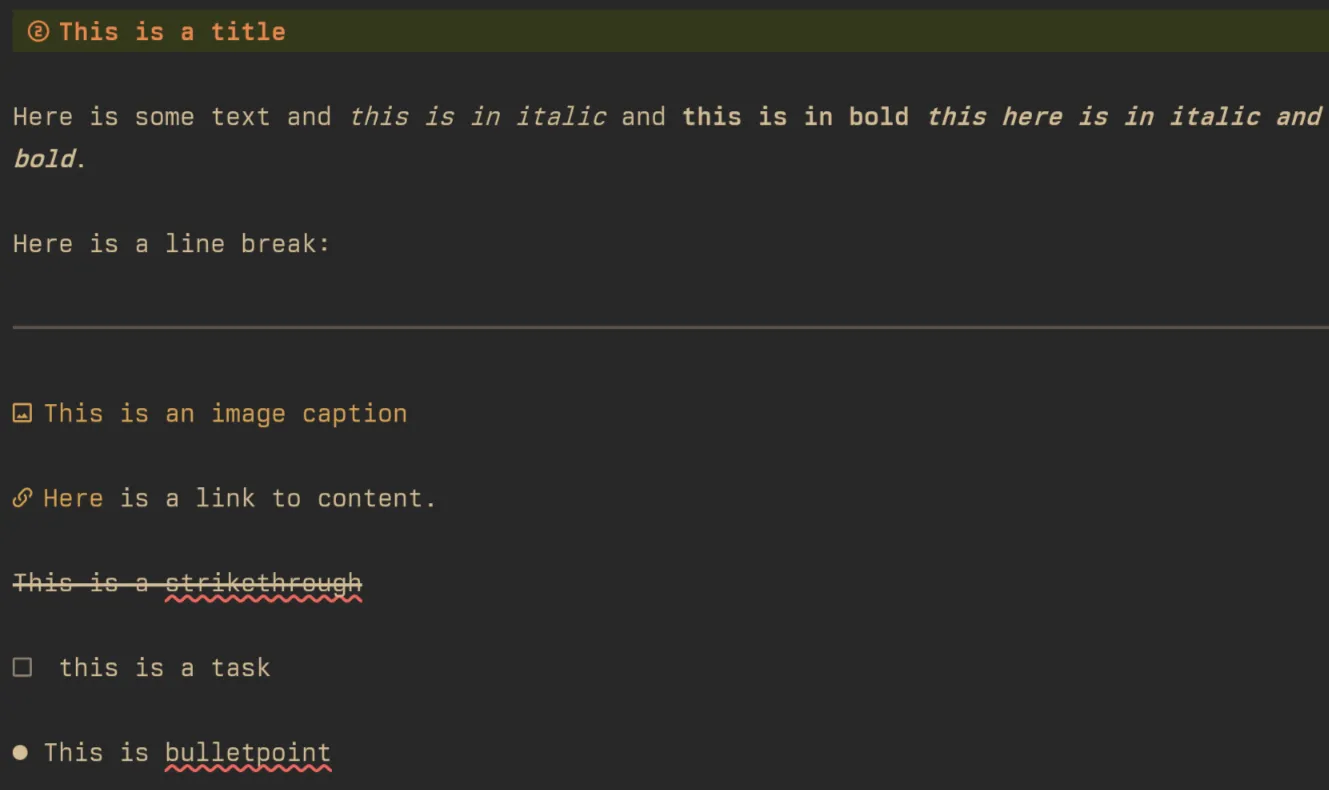
Already inside of Neovim it markdown looks a lot better than without the use of a rendering plugin. However, what is lacking in these rendering plugins is the ability to render mermaid diagrams or chart.js diagrams. Additionally, while there are terminals that now support image rendering such as ghostty and kitty I have found these image rendering solutions in Neovim to be a bit buggy sometimes. If for example I were to resize the terminal the image would automatically get stuck to full 20000000px * 2000000px in size (I exaggerate here, but basically the images are ungodly huge).
There is a workaround here though. There is yet another plugin, markdown preiveiw. This plugin works alongside Neovim, basically it serves a localhost which opens up a tab in your browser of choice and renders the markdown to html. This has advantages as it renders the markdown on the fly and is super fast and responsive. But you’ll notice the Github repo has been left abandoned for some time, and while it still works nicely to this day, there are some improvements and feature additions that this plugin really begs for.
This is where Typora comes in
Typora is a nice little application that prides itself in being a WYSIWYG markdown editor. Truly it seems that it really is that! It means that I can literally render a mermaid diagram like this (as I type the code for it) 2:
Market share by category - 2025
Compare this to what neovim renders:
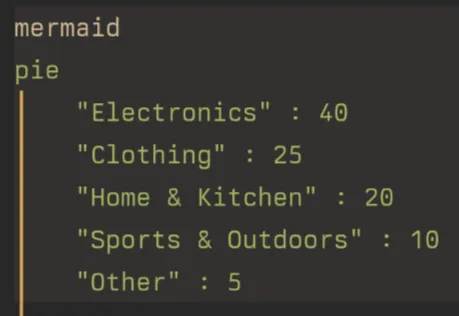
There is quite a big difference. I am not saying that I am often using mermaid diagrams but when I do want to use one I would rather use Typora to see exactly how it would be rendered as opposed to rendering the markdown to a pdf or something similar.
Typora also visually looks like a nice editor and a nice distraction free space in which to write in to. This makes it more enjoyable to write overall without all the visual overload that you get from other editors. I can simply put Typora in full-screen and typewriter mode and be in the headspace to write.
I’m not abandoning Neovim
I still will use Neovim to type and edit markdown though. One of the most important things to me is neovim motions. Regrettably Typora lacks these motions and the community have been requesting this as a feature for quite some time now. Here is the Github issue with 162 comments, since 2016! It doesn’t seem like the Typora developers are too keen on adding this feature. However there are plugins for Typora. Perhaps we will see a plugin be available, if not it is something that I would invest a bit of time to developing in the future.
Footnotes
-
Markview was coded all by a single guy on his mobile phone! Which is not only an impressive feat, but also brought about some of the best of the Neovim community, coming together and buying this guy a laptop!! . ↩
-
I also added mermaid diagram support to the blog site so it means I can render some nicely produced mermaid diagrams in the future!! 🎊 ↩
Reactions
Comments
Loading comments...